
Ready Made Progress Bar Section
How to Add and Customize the Progress Bar Section in InterFunnels
The Progress Bar section in InterFunnels is a useful tool for displaying user progress, sales milestones, or completion levels. This guide will walk you through adding and customizing the Progress Bar Section in your funnel pages.
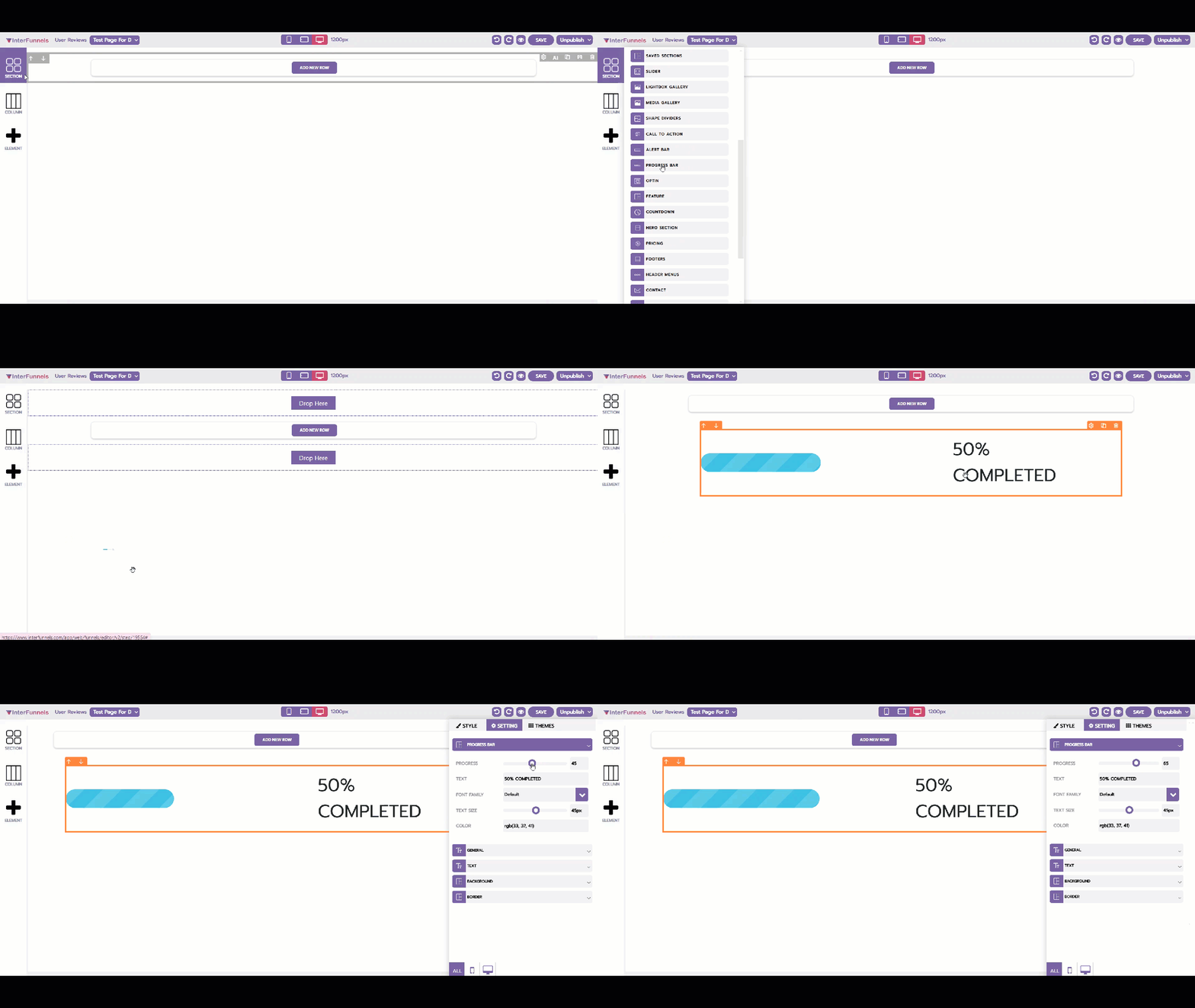
Step 1: Accessing the Funnel Builder
-
Log in to your InterFunnels account.
-
Open the funnel page where you want to add the Progress Bar.
-
Click on the Editor to start editing the page.
Step 2: Adding the Progress Bar Section
-
On the left sidebar, click on the "Section" icon.
-
Look for the "Progress Bar" section in the pre-designed section templates.
-
Drag and drop the Progress Bar onto your funnel page.
Step 3: Customizing the Progress Bar
Once the Progress Bar is added, you can customize it based on your requirements:
1. Editing the Progress Label
-
Click on the text inside the Progress Bar.
-
Enter a relevant message (e.g., "Your progress: 50% complete").
-
Adjust the text size, font, and color using the formatting toolbar.
2. Adjusting the Progress Percentage
-
Click on the Progress Bar element.
-
Go to the Settings Panel and adjust the completion percentage.
-
You can manually set a value (e.g., 75%) or make it dynamic based on user actions.
3. Changing the Bar Color
-
Click on the Progress Bar.
-
Go to the Design Settings panel.
-
Select a primary color for the bar that matches your funnel’s branding.
4. Adding an Animation Effect
-
Navigate to the Animation Settings.
-
Enable smooth transitions so the bar loads dynamically when users visit the page.
5. Adjusting Width & Positioning
-
Resize the bar width based on your design needs.
-
Align the Progress Bar at the top, middle, or bottom of your section.
Step 4: Saving & Publishing
-
Click the Save button at the top-right corner to save your changes.
-
Click Preview to check the responsiveness of the Progress Bar.
-
If satisfied, click Publish to make the changes live.
Conclusion
The Progress Bar in InterFunnels helps improve user engagement by visually tracking progress. With customization options for text, colors, and animation effects, you can make it a valuable tool for enhancing user experience and conversions.
Start using the Progress Bar Section today to create engaging funnel pages!