
Ready Made - Call to Action Section
The Importance of an Effective Call to Action (CTA)
In the world of online sales funnels, a Call to Action (CTA) is a pivotal element that can make or break conversions. Whether you're aiming to capture leads, drive purchases, or encourage sign-ups, your CTA must grab attention and guide users toward taking the desired action. But what if creating the perfect CTA was as easy as dragging and dropping? That's where Interfunnels excels.
Why Interfunnels Stands Out
At Interfunnels.com, we've taken the guesswork out of designing CTAs. With an intuitive drag-and-drop designer, you can create stunning CTAs in mere seconds. Our platform offers 10 pre-designed CTA templates that you can instantly add to your funnel page, making it perfect for beginners and professionals alike.
With these tools, you can:
- Quickly create high-converting CTAs.
- Customize every element to match your brand.
- Save time and focus on growing your business.
Step-by-Step Guide: Adding a Call to Action to Your Funnel Page
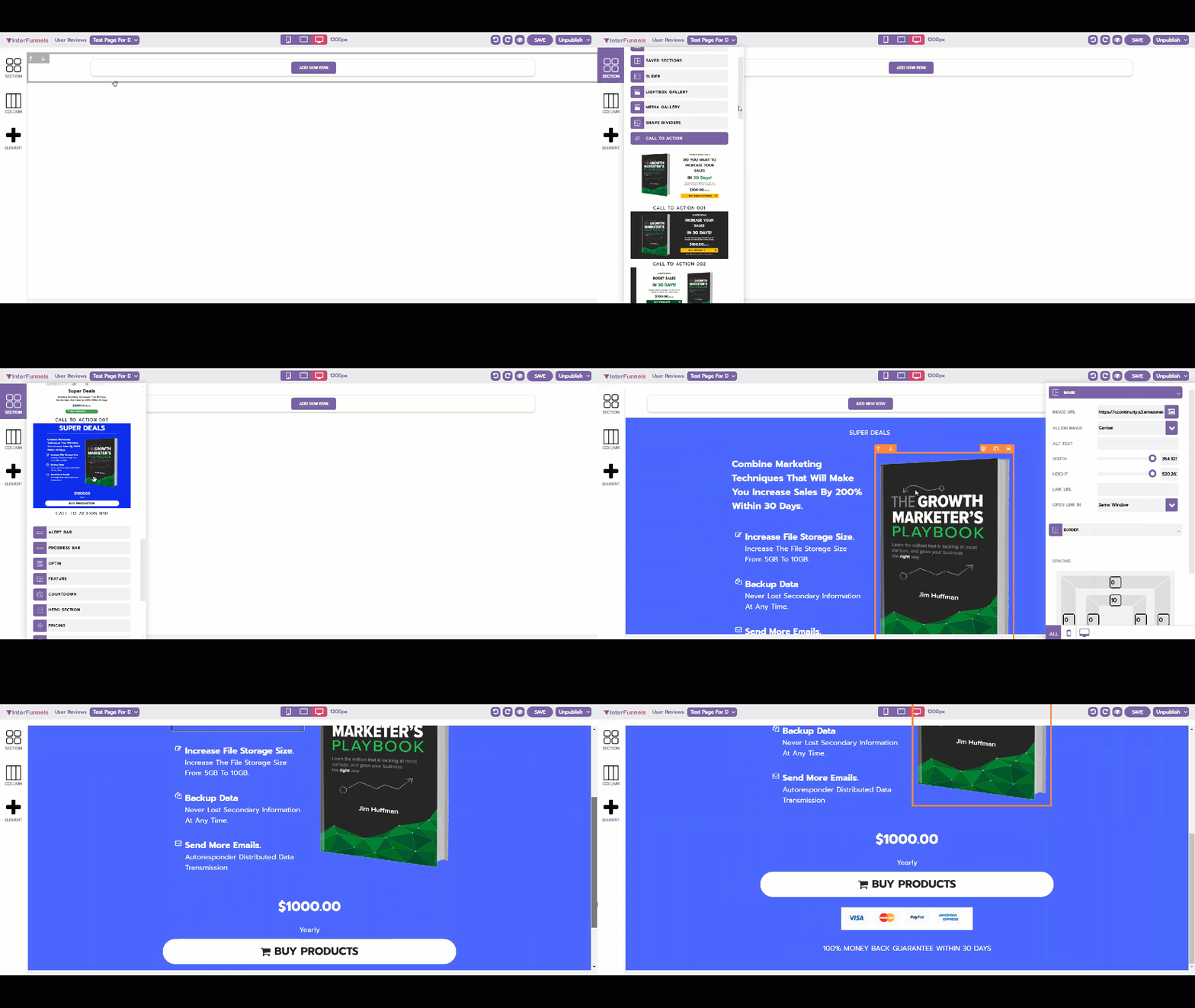
1. Navigate to the Ready-Made Sections
Start by heading to the Sections tab in the drag-and-drop designer. Scroll down to the Ready-Made Sections and find the category for CTAs. Here, you'll see a variety of beautifully designed templates, each optimized to drive conversions.
2. Drag and Drop Your Chosen Template
Once you've picked a template that fits your needs, simply drag and drop it onto your funnel page. It's that easy! You’ll see the section seamlessly integrate into your design, ready for further customization.
3. Customize the Image
Click on the image within the template to access its options menu. Here, you can:
- Replace the default image with one from your library or upload your own.
- Adjust the size and positioning to perfectly fit your funnel's design.
4. Edit the Text
Each text element in the template is fully editable. Click on the text fields to:
- Add your unique messaging.
- Use formatting tools to highlight important phrases.
- Align the text for visual appeal.
5. Configure the Call-to-Action Button
The CTA button is the star of the show. Click on the button to open its settings menu. You can:
- Edit the text to reflect your specific action, such as "Buy Now," "Sign Up," or "Learn More."
- Set the destination link, ensuring the button takes users to the correct page.
- Customize the color to match your brand or grab attention.
6. Preview and Save Your Changes
Once you've made all the necessary edits, preview your funnel to see the changes in action. If everything looks good, save your work and get ready to convert your visitors into customers!
Why This Feature is a Game-Changer
Interfunnels' drag-and-drop designer eliminates the need for coding or advanced design skills. By providing ready-made sections and effortless customization options, it empowers users to create professional-grade CTAs that stand out.
With Interfunnels, building high-converting funnel pages has never been easier. Start customizing your CTAs today and watch your conversions soar!