
Ready Made Optin Form Section
How to Add and Customize the Opt-in Form Section in InterFunnels
The Opt-in Form section in InterFunnels is an essential tool for capturing leads, collecting user information, and growing your email list. This guide will walk you through adding and customizing the Opt-in Form Section in your funnel pages.
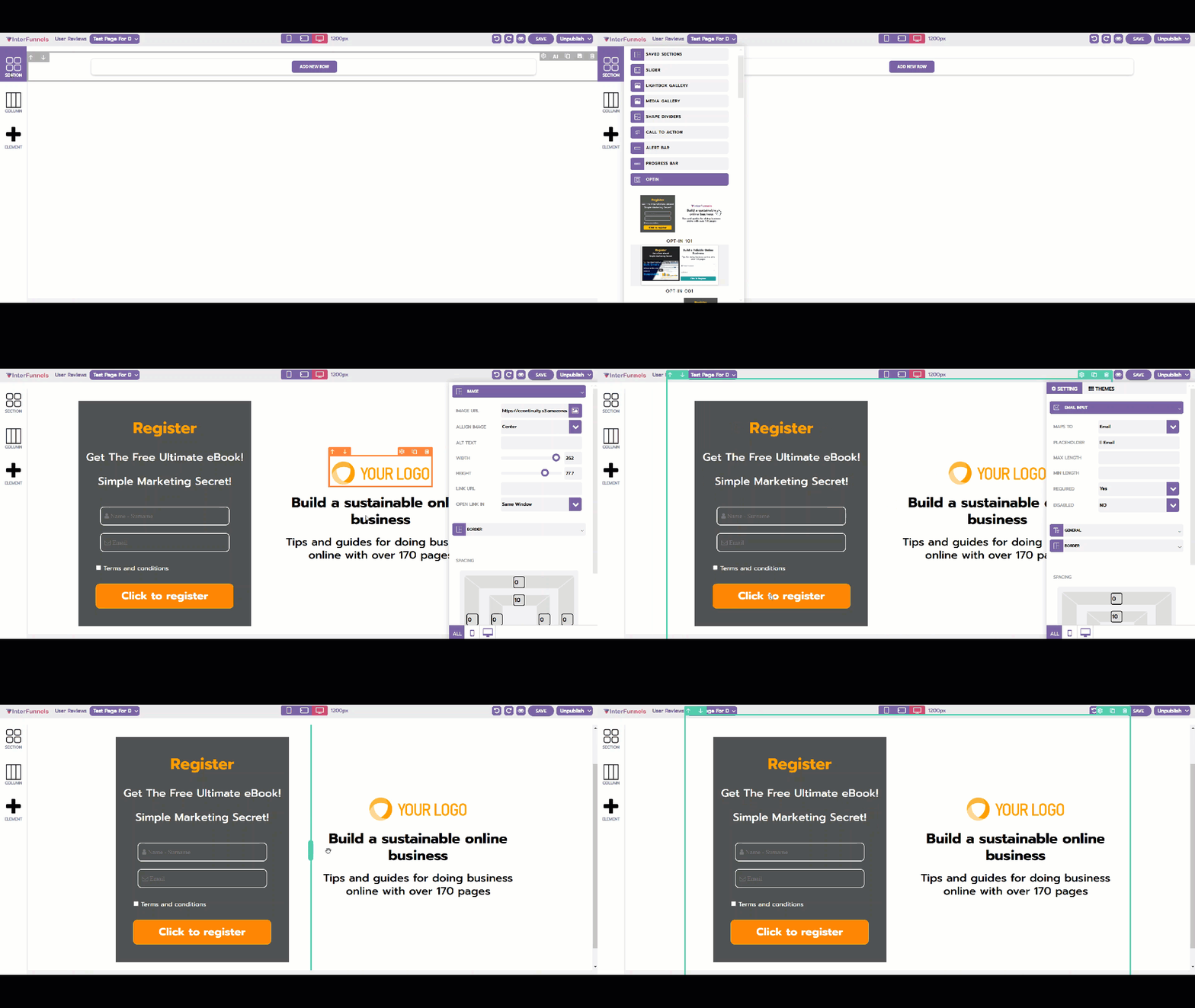
Step 1: Accessing the Funnel Builder
-
Log in to your InterFunnels account.
-
Open the funnel page where you want to add the Opt-in Form.
-
Click on the Editor to start editing the page.
Step 2: Adding the Opt-in Form Section
-
On the left sidebar, click on the "Section" icon.
-
Look for the "Opt-in Form" section in the pre-designed section templates.
-
Drag and drop the Opt-in Form onto your funnel page.
Step 3: Customizing the Opt-in Form
Once the Opt-in Form is added, you can customize it based on your requirements:
1. Editing the Form Fields
-
Click on the Opt-in Form section.
-
You can modify default fields like Name and Email or add additional fields.
-
Drag and drop fields to rearrange their order.
2. Adjusting the Design & Layout
-
Click on the form and go to the Design Settings panel.
-
Adjust the background color, padding, and border styles.
-
Customize the form width and alignment to match your page layout.
3. Customizing the Call-to-Action (CTA) Button
-
Click on the Submit Button inside the form.
-
Change the button text (e.g., "Sign Up Now" or "Get Instant Access").
-
Customize the button color, size, and hover effects.
4. Integrating Email Marketing Services
-
Navigate to the Form Actions settings.
-
Choose where the submitted data should be sent (e.g., an email autoresponder like MailChimp, ActiveCampaign, or InterFunnels’ built-in CRM).
-
Set up a thank-you page redirect after submission.
5. Adding an Exit Popup or Inline Form Option
-
You can enable an exit-intent popup to show the opt-in form when users attempt to leave the page.
-
Choose between an inline form or a modal popup display.
Step 4: Saving & Publishing
-
Click the Save button at the top-right corner to save your changes.
-
Click Preview to test the Opt-in Form’s appearance and functionality.
-
If satisfied, click Publish to make the form live and start collecting leads.
Conclusion
The Opt-in Form in InterFunnels is a powerful feature for capturing user information and improving conversions. With flexible customization options, you can design an effective lead generation form tailored to your funnel’s needs.
Start using the Opt-in Form Section today to grow your email list and maximize your marketing efforts!